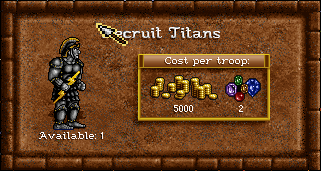
Castle screen, creature information window with right click, incorrect position of elements
#1,731 opened on Sep 19, 2020
Repository metrics
- Stars
- (3,415 stars)
- PR merge metrics
- (PR metrics pending)
Description
In fheroes2, the position of the elements in the creature info window is incorrect. In the original game, the position of the elements in the creature info window is not correct either.
I suggest positioning the elements this way:
-
vertically position the baseline of the title text 36 pixels from the upper edge of the window.
-
horizontally center the title in the window.
-
horizontally center the sprite of the creature between the interior border of the frame (inside the bricks, 13 pixels from the edge of the window) and the edge of the yellow frame of the creature cost.
-
position the text for number of creatures 3 pixels below the bottom of the creature sprite.
-
horizontally center the text for number of creatures with the sprite of the creature.
-
position the baseline of the text for number of creatures at 25 pixels from the lower edge of the window.
-
position the resource sprites horizontally by putting an equal space between the resource sprites and the yellow edges of the creature cost frame.
-
position the number of resources 3 pixels below the bottom of the resource sprite.
-
horizontally center the number of resources in relation to the sprite of the resource.
-
vertically center the block of resource sprites and resource numbers between the inside of the yellow edges of the creature cost frame.
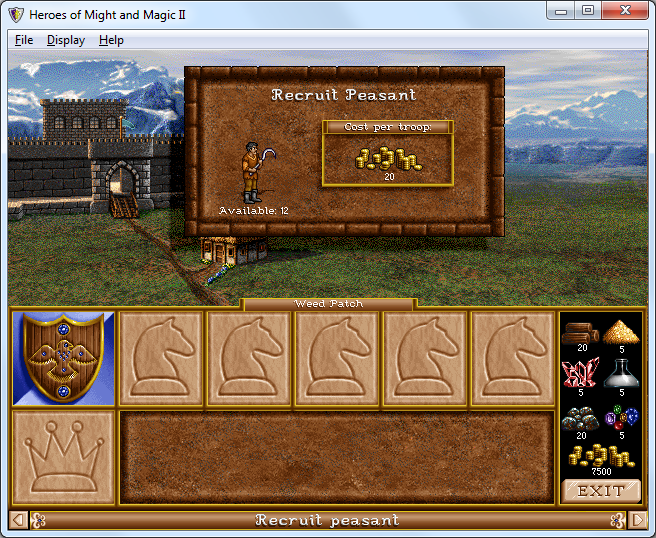
In original game:
In fheroes2:
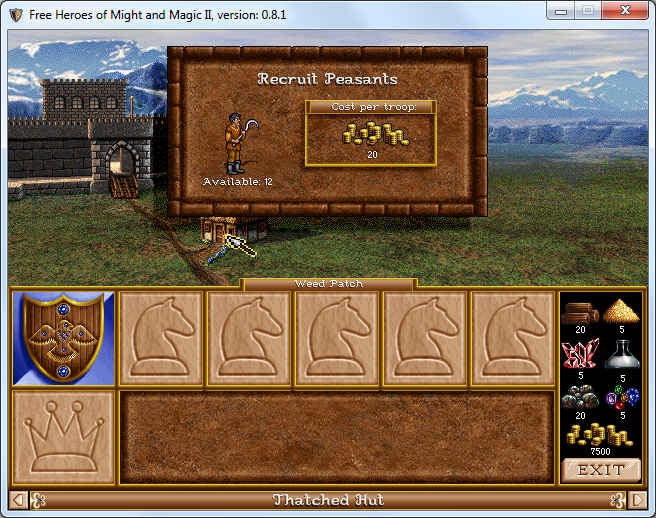
Open the two images in different tabs in your browser, enlarge the images and switch between the two tabs alternately. Heroes 2 first, fheroes2 second.
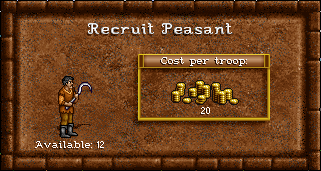
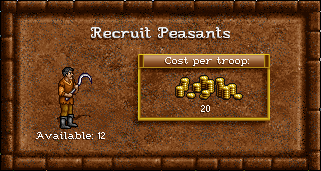
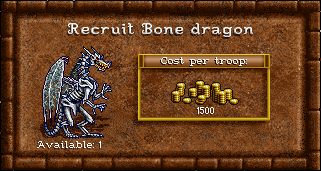
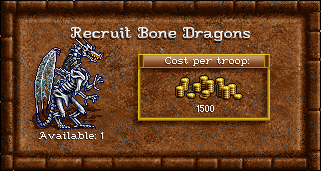
Note: For the creature recruit window, the common elements at the top of the window must be in the same position as the elements of the creature information window with right click.
In fheroes2: Open the two images in different tabs in your browser, enlarge the images and switch between the two tabs alternately.