
microsoft/PowerToys
View on GitHubDisplay mouse location and windows clipboard manager not working after switching 'ctrl' and 'alt'
Open
#11,878 opened on Jun 26, 2021
Help WantedIssue-BugPriority-2Product-Keyboard Shortcut ManagerStatus-Reproducible
Repository metrics
- Stars
- (133,154 stars)
- PR merge metrics
- (Avg merge 14d 20h) (117 merged PRs in 30d)
Description
Microsoft PowerToys version
0.37.1
Running as admin
- Yes
Area(s) with issue?
Keyboard Manager
Steps to reproduce
Apply the following remapping
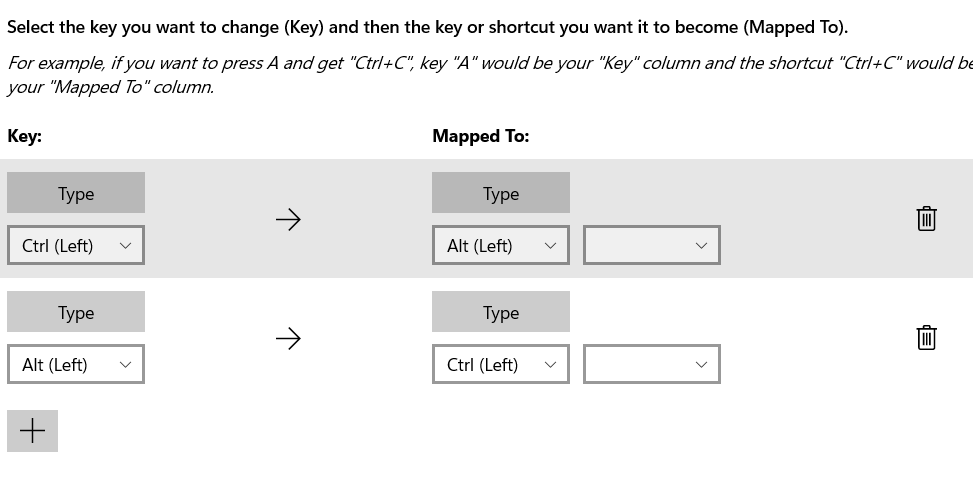
✔️ Expected Behavior
There is an option in the Mouse Configuration

Display the location of mouse when clicking CTRL
The windows clipboard manager (win + v) will paste the correct stuff.
❌ Actual Behavior
However, it won't work if I type the LEFT ctrl. But the RIGHT ctrl works fine.
Moreover, the windows clipboard manager (win + v) won't work. The manager window will open, but nothing is pasted if I choose something.
Other Software
No response